
To ensure your text messages are delivered reliably and to comply with the latest The Campaign Registry (TCR) and carrier standards, we have updated our platform’s consent and legal link features. These changes help you pass “manual vetting” by carriers like Twilio.
Why these updates matter
Mobile carriers now manually review the websites and forms where your customers “opt-in” to receive texts. If they don’t see clear, separate choices for different types of messages—or if they can’t find your specific legal policies—they will reject your campaign, preventing you from sending SMS.
These updates automate that compliance for you.
New: Separate “Transactional” vs. “Marketing” Consent
In the past, one checkbox was often enough. Today, carriers require unbundled consent. This means a customer should be able to sign up for functional updates (like booking confirmation) without being forced to receive promotional “blasts.”
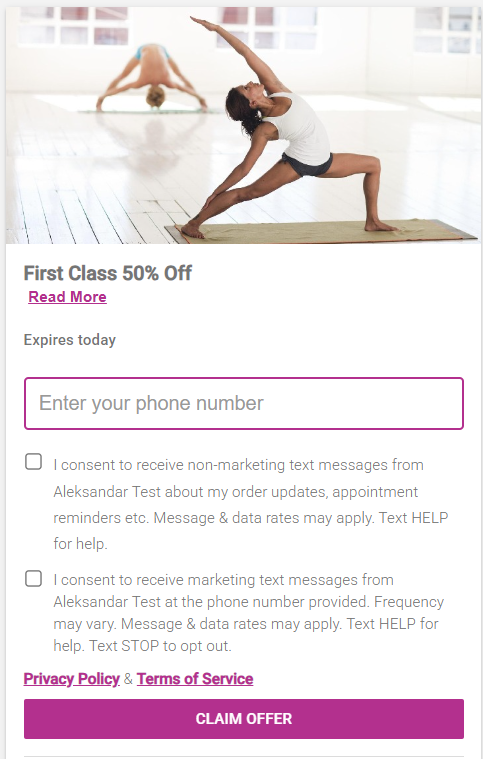
How it works on your forms:
All Widgets, and Share Links now display two distinct, unticked checkboxes:
- Transactional Box: Covers non-marketing alerts like appointment reminders and order updates.
- Marketing Box: Covers promotional offers and news.
Compliance Note: Per industry regulations, these boxes cannot be pre-checked. Your customers must physically click them to give “express consent.”
Adding Your Custom Legal Links
Carriers want to see your business’s legal language, not just ours. You can now host your own legal pages and link them directly to your SMS forms.
How to set this up:
- Navigate to your Edit Profile page.
- Expend the drop-down menu in the upper right corner, next to your business name.
- Click on My Account option.
- Click on Edit Company Profile
- Navigate to the Media page.
- Locate the two new fields: Privacy Policy URL and Terms of Service URL.
- Paste the full links (starting with
https://) from your company website. - Click Save.
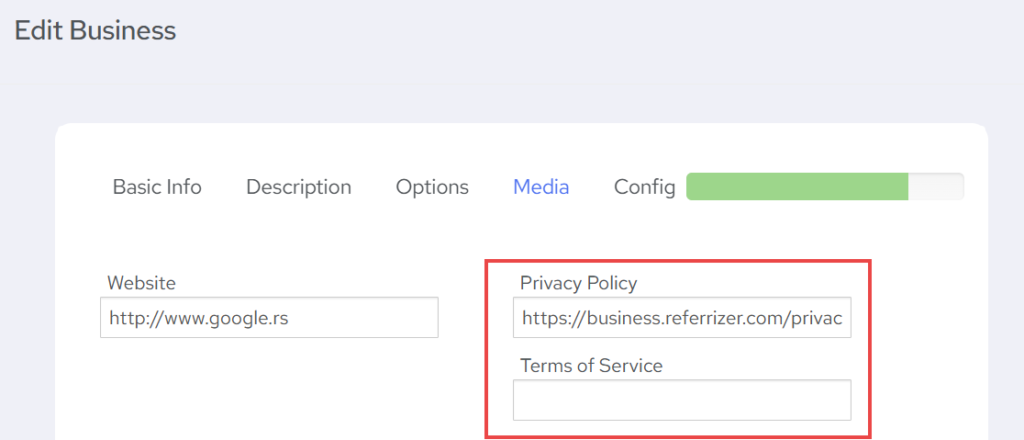
What happens if I leave these blank?
If you don’t have your own links yet, don’t worry. The system will automatically use our Default Platform Terms as a fallback so your forms remain functional and compliant. However, we highly recommend adding your own URLs to increase your TCR approval speed.
Where will these changes appear?
You don’t need to do any manual coding. These updates are automatically applied to:
- Lead Capture Widgets (Popups & Banners)
- Inline Forms
- The Offer Wizard (Preview & Live screens)
- Universal Share Links & HQ Offers
Pro-Tips for Fast Approval
- Check your wording: Ensure your website’s Privacy Policy explicitly mentions that “phone numbers collected for SMS consent will not be shared with third parties for marketing purposes.”
- Accessibility: Ensure your legal links are “Public.” If an auditor clicks your link and sees a “Login Required” screen, they will reject the campaign.
Need more help? If you have questions about specific legal language for your industry, please contact our support team or consult with your legal counsel.