
Referrizer now supports UTM tags, allowing you to track and segment your contacts based on campaign, source, medium, and content. This feature helps you better understand your marketing campaign performance by combining Referrizer data with external sources for deeper insights.
What are UTM Tags?
UTM (Urchin Tracking Module) tags are parameters that you can add to URLs to track the effectiveness of your marketing campaigns. These tags provide valuable insights into where your traffic is coming from and how your marketing efforts are performing. This guide applies to all digital marketing campaigns where clients use Zapier to send leads to Referrizer. It helps maintain uniformity in UTM parameters across platforms and keeps reporting data reliable.
Referrizer now supports the following UTM tags for each contact:
| Parameter | Description | Example |
| utm_source | Identifies the platform sending the traffic | google, facebook, tiktok |
| utm_medium | Specifies the marketing channel or medium | cpc, social, email |
| utm_campaign | Names the specific campaign or promotion | lead-generation-holiday-sale |
| utm_term (optional) | Tracks paid search keywords (for PPC ads) | running-shoes, fitness-classes |
| utm_content (optional) | Differentiates between ad creatives or links | image1, video2 |
Guidelines for Using UTM Tags
- Use lowercase letters only.
- Separate words with hyphens (-).
- Avoid spaces and special characters.
- Use the following URL format:
https://example.com?utm_source={source}&utm_medium={medium}&utm_campaign={campaign}&utm_term={term}&utm_content={content}
Detailed Parameter Use
utm_source
- Matches the traffic source platform.
- Examples:
utm_source=google,utm_source=meta,utm_source=tiktok
utm_medium
- Reflects the marketing channel:
- Examples:
utm_medium=cpc,utm_medium=social,utm_medium=email
utm_campaign
- Follow the structure:
{campaign-objective}-{promotion}-{location} - Example:
utm_campaign=lead-generation-holiday-sale-miami
utm_term
- Include search keywords for paid ads, or use n/a if not applicable.
utm_content
- Use to differentiate ad creatives or link versions.
- Examples:
utm_content=image1,utm_content=video2
UTM Tagging Examples by Lead Capture Method
Landing Page Leads
- utm_source: Platform driving traffic (e.g., google)
- utm_medium: Campaign type (e.g., cpc, social)
- utm_campaign: Campaign name (e.g., summer-sale-2024)
- utm_term: Keyword or
n/a - utm_content: Landing page or ad variation (e.g., landing-page-version1)
Example: https://example.com?utm_source=google&utm_medium=cpc&utm_campaign=summer-sale-2024&utm_term=fitness-classes&utm_content=landing-page-version1
Lead Ads (Meta, TikTok)
- utm_source: Platform where lead ad runs (e.g., meta)
- utm_medium: Always
social - utm_campaign: Campaign name (e.g., lead-generation-holiday-sale)
- utm_term: n/a unless keywords apply
- utm_content: Ad creative or variation (e.g., video-ad-1)
Example: https://example.com?utm_source=meta&utm_medium=social&utm_campaign=lead-generation-holiday-sale&utm_term=n/a&utm_content=video-ad-1
Email Campaigns
- utm_source: Email platform (e.g., mailchimp)
- utm_medium: Always
email
- utm_campaign: Campaign name (e.g., winter-promo-2024)
- utm_term:
n/a
- utm_content: Email version or variation (e.g., email-version-a)
Example: https://example.com?utm_source=mailchimp&utm_medium=email&utm_campaign=winter-promo-2024&utm_term=n/a&
Consistent UTM tagging enables accurate tracking and reporting across marketing channels. Following these guidelines ensures data integrity in Referrizer reporting and helps optimize campaign performance.
Every contact in Referrizer can now have UTM tags associated with it. These tags are displayed in the Custom Fields section of each contact profile page and are captured through various touchpoints, including Zapier, widgets, email links, and campaign links.
How to Access UTM Tags in Referrizer
Follow these steps to view UTM tags associated with your contacts in your Referrizer account:
- Click on Contacts in your sidebar navigation.
- Select a contact from the list to go to the Contact Profile page.
- Next to the contact’s name, click the drop-down menu, and select Edit to open the contact details.
- Scroll down to the Custom Fields section, which is located beneath the basic and address information.
- Here, you’ll find the UTM parameters listed, including:
- UTM Term
- UTM Medium
- UTM Campaign
- UTM Content
- UTM Source
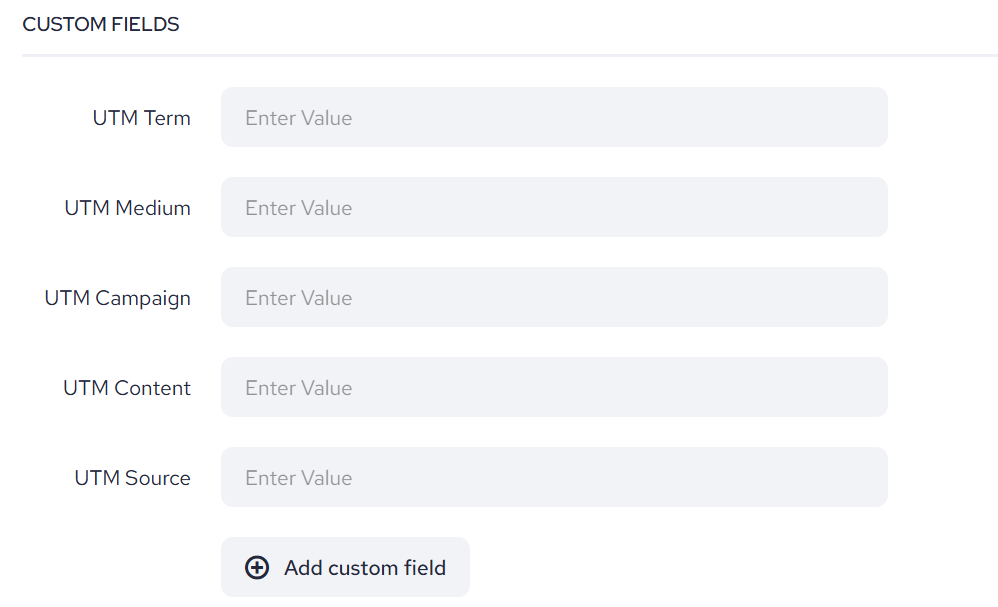
With these UTM tags, you can effortlessly track and segment your contacts based on the performance of your marketing campaigns. Currently, only the last recorded UTM entry is displayed in the UI, meaning previous entries appear to be overwritten. However, the full history is securely stored in our database. In the future, we plan to introduce a feature that will allow you to view the complete history of UTM entries.