
About Booker
Booker by Mindbody is a cloud-based spa/salon booking solution that provides businesses in the cosmetics and wellness industry, such as spas and salons, with tools that help them to manage their booking routines, payments, customer interactions, and marketing activities.
What can I do with Booker integration?
- Segment customers based on data from Booker, (e.g. membership, visits, etc.)
- Engage customers in Referral program
- Engage customers in Loyalty program
- Get new online reviews and customer feedback
How can I integrate Booker with Referrizer?
- Firstly, go to our Integration page
- Click START on the Booker card
3. On this page you will be asked for your Location ID
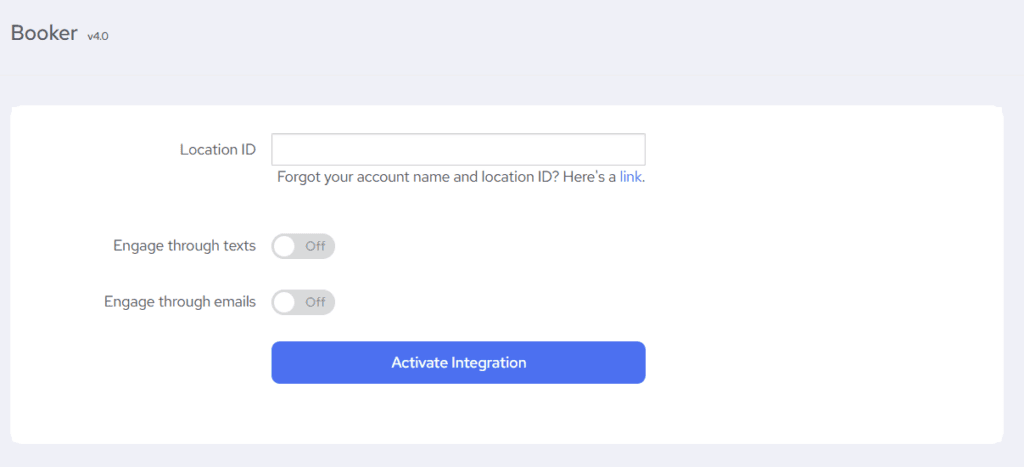
4. After you click on the Activate Integration button, you’ll be redirected to a Booker authorization page where you will be asked to sign in with your Booker username and password and allow integration.
5. On the next page, you will have to allow Referrizer to integrate with your Booker account.
6. Once the integration has been completed you will be redirected to the Booker integration page in Referrizer.
With the sync enabled, all contacts will be moved from Booker to your Referrizer account. Contacts are classified as active vs. passive based on how long since their last visit (using the account’s buying cycle). They are not auto-placed into named customer groups. Additionally, from this moment on, we will also sync:
- Any future entry of a new contact
- Any changes to the existing contacts
- Every check-in to Booker
What data are being synced from Booker to Referrizer
Once connected, Referrizer will sync your customer data from Booker. Here’s what to expect:
Initial Sync:
- All customers: Referrizer will pull a list of your members or clients so you can easily manage communications.
Hourly Sync:
- New check-ins: This sync is conducted once per hour.
- New bookings: We don’t import upcoming bookings as separate records. Hourly sync turns finished appointments into visits/check-ins.
- New leads: When a lead is created in Booker, we create this lead in Referrizer.
What’s supported
The list below provides a comprehensive reference of the data synchronization between Referrizer and Booker. The following table outlines all data attributes that are synchronized between the two platforms.
Use this document to understand which specific data elements are transferred in this integration, helping you maximize the functionality of your connected systems. The table shows exactly which fields are supported and in which direction data flows.
Booker to Referrizer
The following attributes are synced over to Referrizer from Booker.
Contacts
Note: Contacts must have an email or phone to import; inactive Booker customers are skipped on initial sync.
| First name | Synced initially, Daily |
| Last name | Synced initially, Daily |
| Phone | Synced initially, Daily |
| Synced initially, Daily | |
| Address (Street) | Synced initially, Daily |
| Address (City) | Synced initially, Daily |
| Address (State) | N/A |
| Address (Zip) | Synced initially, Daily |
| Address (Country) | N/A |
| Gender | N/A |
| Birthday | Synced initially and updated on appointment sync |
Subscriptions
| Email subscription | No |
| Text subscription | No |
Visits and bookings
| Number of visits | Yes, Referrizer does increment the visit count when check-ins are recorded |
| Checkins (visits) | Hourly via completed appointments (statuses: checked in, paid/complete, service completed) |
| Referred by | N/A |
| Appointments | N/A |
| Services | N/A |
| Classes | N/A |
| Last Purchases Service/Item | N/A |
| Last Purchases Date | N/A |
| Last Booking Name | N/A |
| Last Booking Date | N/A |
| Last Visit Date | Hourly |
| CRM Member (Y/N) | Yes |
| Membership Comments | N/A |
| Contract Start Date | N/A |
| Contract Name | N/A |
| Contract Expiry | N/A |
| Contract Ended | N/A |
Referrizer to Booker
The following attributes are synced over to Booker from Referrizer.
| First Name | N/A |
| Last Name | N/A |
| Phone | N/A |
| N/A | |
| Address (Street) | N/A |
| Address (City) | N/A |
| Address (State) | N/A |
| Address (Zip) | N/A |
| Address (Country) | N/A |
| Gender | N/A |
| Birthday | N/A |
| Tags | N/A |
| Email subscription | N/A |
| Text subscription | N/A |
| Input source | N/A |
| Referral type | N/A |