
Your plan includes a set number of marketing emails each billing cycle. This article explains which emails count, where to check your usage, and what happens if you go over.
What counts as one email
Each marketing email Referrizer sends to a contact counts as 1 email toward your plan. This includes:
- Emails sent through Email Campaigns, including automated follow-ups and drip campaigns
- Individual marketing emails you send directly to a contact from Referrizer
An email counts as soon as Referrizer sends it to the email provider for delivery. It counts whether or not the contact opens it, and it may still count if it bounces later.
Automated campaigns count every step. Each step sends one email to each recipient. For example, a 3-step campaign sent to 100 contacts can use up to 300 emails over time, not 100.
What doesn’t count
- Test emails and previews you send while building a campaign
- Review request emails and other automated reputation emails to your customers
- Account notifications, such as billing alerts, staff alerts, and password resets
- Emails that fail before Referrizer sends them for delivery
Where to check your usage
- Click your Logo in the top right corner and select Billing from the dropdown.
- Under Plan & Usage, find Credits Usage.
- Open Emails remaining. On some plans this is labeled Emails spent.
You’ll see:
- Emails remaining: your included emails minus what you’ve sent this billing cycle. This number stops at zero.
- Overage sent: emails sent beyond your included amount, followed by your per-email rate in brackets, for example 0 ($0.001/email). Hover over Overage sent to see: “Overage credits are used once your plan credits run out.”
- $ this billing cycle (on the right): your estimated overage charges so far.
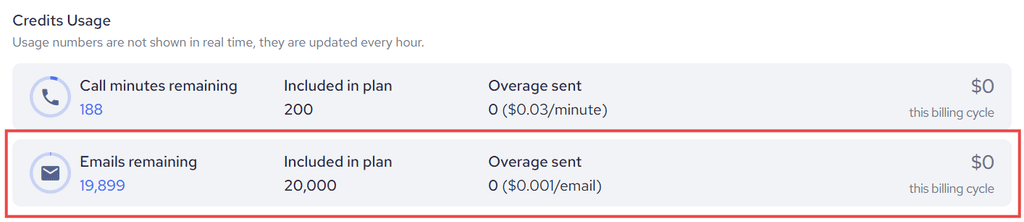
Note: As shown under Credits Usage: “Usage numbers are not shown in real time, they are updated every hour.” If you just sent a campaign, wait up to an hour for it to appear.
How your usage resets
Your email allowance follows your billing cycle, which is the same cycle shown next to Next invoice on. Your included emails reset at the start of each new cycle.
Multi-location accounts: If your location is part of a corporate account, email usage may be billed to the main account’s subscription. Each location can still see its own usage on its Billing page.
What happens if you go over
- Your emails keep sending. Campaigns are not paused when you use all of your included emails.
- Extra emails are charged at your plan’s per-email overage rate. You can find this rate on your Billing page.
- Overage charges appear on your next invoice, together with your plan.
Unlike text credits, email has no top-up or Auto-Refill option. To include more emails each cycle, contact our support team about your plan.
Good to know
- If your count went up faster than expected, check your active automated campaigns. Every step sends a new email to each recipient.
- To avoid surprise charges, check Credits Usage before you send a large campaign.
- If you’re on a trial, you may see a note on Billing with the date email usage billing starts.
- If you don’t see Credits Usage on your Billing page, your account may be on an older billing setup. Contact our support team to confirm how email is billed for your account.