
Your Referrizer subscription includes a set amount of emails, call minutes, and text credits. If you use more than your plan includes, the extra usage is billed at your plan’s rates. Your base subscription stays the same.
What is included
- Emails: a set number of marketing emails each billing cycle. Extra emails are billed at your plan’s per-email rate.
- Call minutes (also called voice minutes): a set amount of Smart Line talk-time each billing cycle. Extra minutes are billed at your plan’s per-minute rate. Both, incoming and outcoming calls are included.
- Text credits: credits for the texts you send. As of October 1, 2026, every text uses credits, including Inbox conversations, automated messages, and campaigns. MMS uses 3 credits.
When this started
- Emails and call minutes: September 18, 2026. Nothing was charged for this usage before that date.
- Texts: October 1, 2026, when your credit allowance began covering all texts, not only campaigns.
Where to check your usage
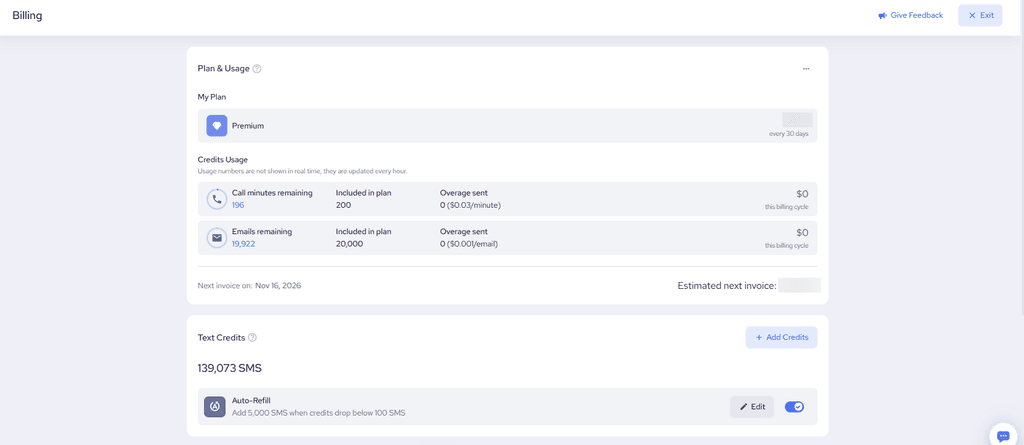
- Go to Billing, or click your logo in the top right and select Billing.
- Under Plan & Usage, open Credits Usage to see emails and call minutes.
- On the same page, find Text Credits for your text balance.
Usage numbers are not shown in real time. They update about once an hour.
What happens if you go over
Sending and calling are not blocked when you use your included amount. Extra emails and extra call minutes appear as overage on your next invoice, at the rates shown on your Billing page. For texts, you can add credits or turn on Auto-Refill so you don’t run out.
If several locations share one paying account, usage may roll up to that account. Check the Billing page for the account that pays for usage.
Learn more