
You can enable your business line for texting by following these steps. The process involves submitting a request, verifying ownership, and completing the hosting setup with Twilio.
Step 1: Submit Your Request
1. Open the Smart Line app.
2. From the options under settings select Business Line Texting
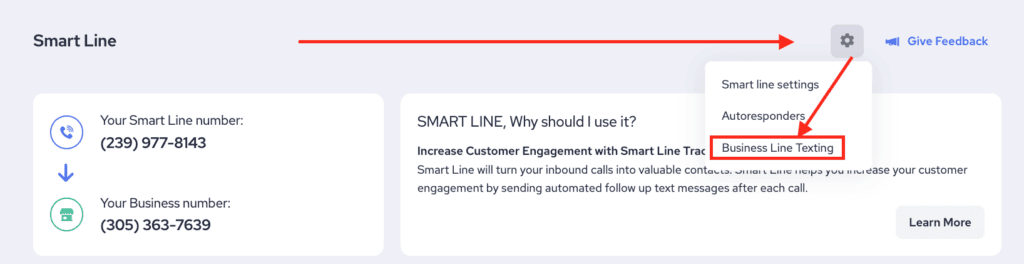
3. Fill out the request form and wait for our support team to contact you with next steps.
Step 2: Hosting Process
Our communication carrier, Twilio, will assess if your number is ready to be hosted. Here’s what they check:
Landline Requirement
- Your number must be a landline.
SMS Routing Profile (SPID)
- If an SMS Routing Profile exists on your number, you must contact your current carrier’s SMS routing department.
Once your number meets these conditions, the following steps are required:

- Verify Ownership
- Sign the Letter of Authorization (LOA)
- Carrier Processing and Testing
- Complete Hosting
Important Information
Before you submit your request, keep the following in mind:
- Texting and Messaging Features
- Loss of Previous Texting Functionality
- Referrizer Smart Line Number
- Complete Any Existing Integrations First
- Contact Data Loss