
You can now generate a unique, separate embed code for each individual offer. This allows you to run targeted campaigns by placing specific offers on different web pages while tracking their performance independently.
1. Access the Promotion Menu
- Log in to your dashboard and click on Offers & Referrals in the left menu.
- Select the Promote on Website button in the top right corner.

2. Select Your Widget Type
Choose the style that best fits your website goals:
- Popup (Attention-Grabbing): An overlay that appears automatically to capture visitor attention fast.
- Banner Strip (Persistent & Discreet): A sleek horizontal bar that displays your offers without interrupting the user flow.
- Inline Embed (Seamless Integration): Displays the offer directly inside a page or blog post—ideal for specific content sections.

3. Choose Your Offer Strategy
This is where you decide how your offers are displayed:
- All Active Offers – Carousel (Recommended): Use one shared code to automatically rotate through all your active promotions. This is great for general visibility across your site.
- Together with this, you need to make sure that this type of promoting your offers is enabled within the Offer Editor by checking the Website Widget – All Active Offers carousel box in the Promote this Offer section.

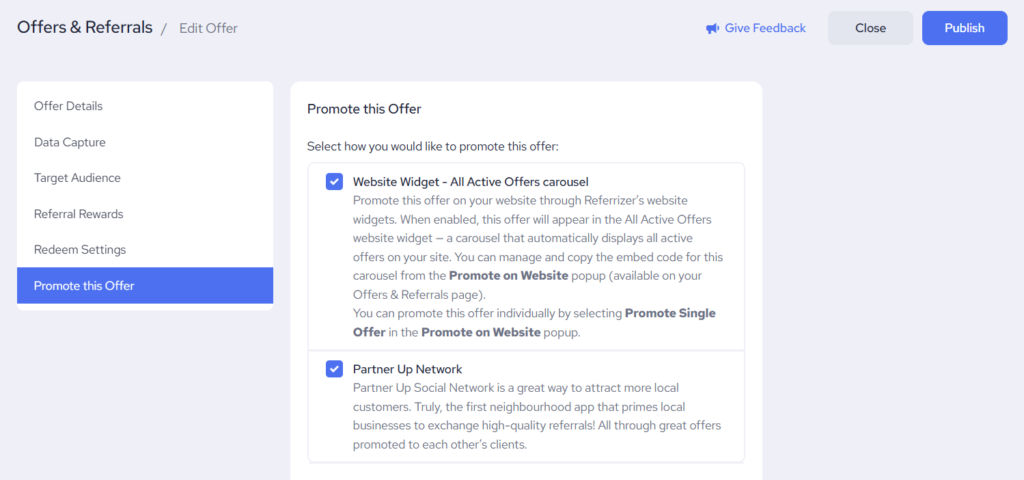
- Single Offer (Manual): Select this to generate a unique, dedicated embed code for one specific offer. This is the best choice for targeted landing pages where you want separate management and analytics. When selecting you will have a chance to choose one specific offer out of all currently active offers within your account.

4. Copy and Install
- After selecting your offer, the system automatically generates a unique code.
- Click Copy Code and follow the installation instructions for your specific website builder.
- You can find instructions for the most common website builders here.