
The Target audience section of your AI Assistant Settings controls which types of contacts the AI engages with in your Inbox. This lets you start narrow (for example, leads only) and expand as your confidence grows.
Where to find it
- On the left-hand sidebar menu, click AI Assistant.
- Click the Settings (gear icon) in the top right corner.
- Scroll to the Target audience section.
Contact types
You can switch each contact type ON or OFF independently:
- Current customers – active clients with a membership or a recent visit.
- Past customers – previous clients who have since lapsed.
- Leads – prospects who haven’t booked yet.
Next to each type, you’ll see how many of your contacts it includes, and at the bottom of the section, the total number of contacts the AI will engage with, based on your selection. Use Select all to include everyone at once – by default, all three types are selected.
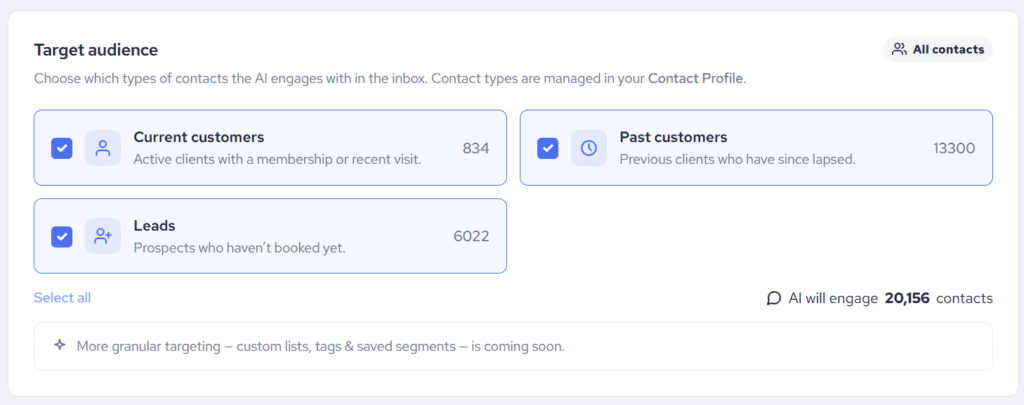
Contact types are managed in each contact’s Contact Profile – if someone is in the wrong group, update their profile and the AI will treat them accordingly.
Good to know
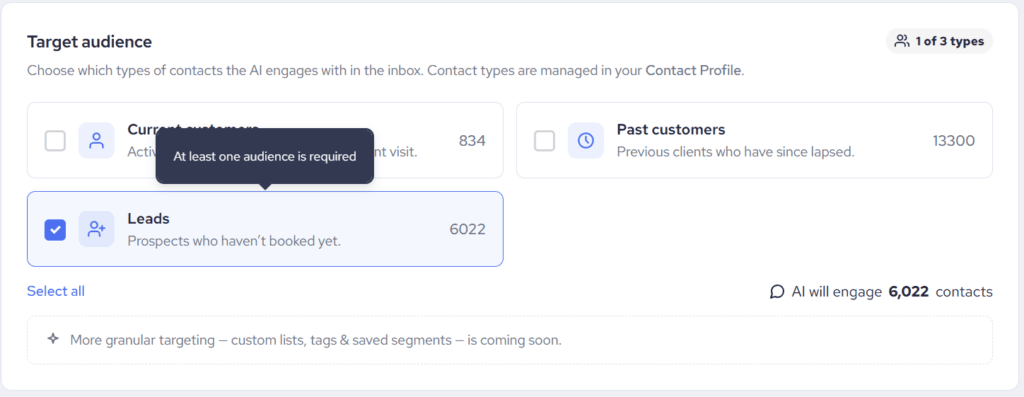
- At least one contact type must stay selected. You can’t deselect all three – if you want the AI to stop engaging entirely, switch its status to Paused instead.
- The target audience filters who the AI talks to; it doesn’t delete or change any conversations. Contacts outside your selection simply land in your Inbox as regular conversations for your team.
- To keep the AI out of one specific conversation regardless of contact type, use the per-conversation AI toggle. See How Can I Switch ON or OFF My AI Assistant Per Individual Conversation?
- More granular targeting – custom lists, tags and saved segments – is coming soon.