
When customers ask to book, your AI Assistant can share your direct booking link – a simple way to turn booking requests into appointments without a full booking integration. This article shows how to set it up.
Who this is for
The Booking Link is available for accounts without an active booking integration. If your account has a booking integration connected, the AI Assistant books appointments directly instead of sending a link, and this section doesn’t apply.
Setting up your booking link
- On the left-hand sidebar menu, click AI Assistant.
- Click the Settings (gear icon) in the top right corner.
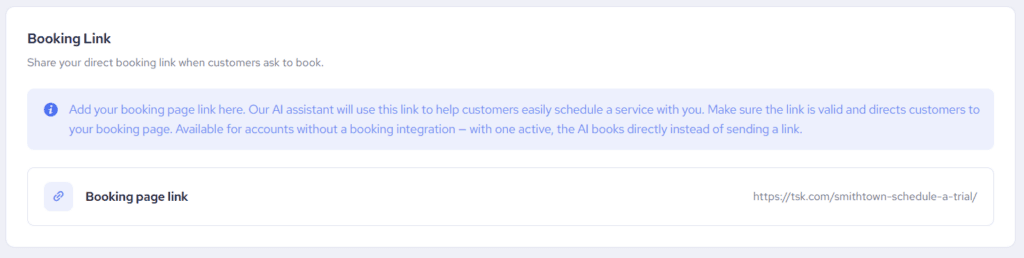
- Scroll to the Booking Link section.
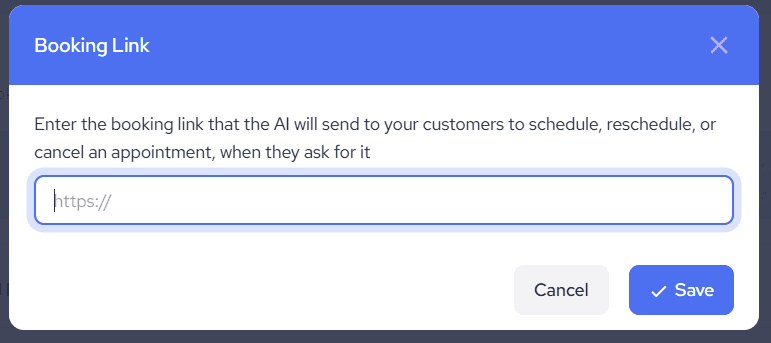
- Click the Booking page link row, enter your booking page URL, and click Save.
Make sure the link is valid and takes customers straight to your booking page – the AI Assistant shares it exactly as entered.
How the AI Assistant uses it
Whenever a customer asks to schedule, reschedule, or cancel an appointment, the AI Assistant includes your booking link in its reply, so the customer can manage it themselves. The assistant handles the surrounding conversation – answering questions about services, pricing, and availability from your Knowledge Base – and the link closes the booking.
Changing or removing the link
Click the Booking page link row any time to update the URL. To remove the link, clear the field and save – with no link stored, the AI Assistant handles booking questions conversationally and flags them for a human when needed.